
Most of us start the day with a long to-do list and no real plan for tackling it. We jump from task to task, get pulled into emails, and lose hours to distractions. By the evening, half the list is still there. Time blocking fixes this by giving every task its own slot on your calendar, so your day has structure instead of chaos.
Even top performers use this method. Manchester City manager Pep Guardiola is known for planning his time down to the hour. This article breaks down what time blocking is, why it works, and how to build your own system. You’ll also find common mistakes to avoid and answers to frequent questions.
Before we start, subscribe to my YouTube channel, PRODUCTIVE MINDSETZ, for more short, practical productivity tips.
What Is Time Blocking?
Time blocking is a scheduling method. You divide your day into blocks of time and assign one task, or one type of task, to each block. Instead of an open-ended to-do list, you get a visual map of your day. Each hour has a job to do.
This is different from just writing down what you need to do. A to-do list tells you what needs doing but not when. Time blocking answers both questions at once. You decide in advance when you’ll write that report, when you’ll answer emails, and when you’ll take a break. This removes the daily guesswork of deciding what to do next, which is often where procrastination creeps in.
The method works for any kind of day. It suits office workers, freelancers, students, and parents managing a home. You can block time for deep work, admin tasks, exercise, or family time. The structure stays the same: pick a task, give it a fixed slot, and protect that slot from interruptions.
Time Blocking vs a Plain To-Do List
A to-do list is simple. You write tasks down and cross them off as you finish. The problem is that it doesn’t account for time. You might list ten tasks with no sense of which will take ten minutes and which will take three hours. This often leads to a false sense of progress, where you tick off small, easy tasks and leave the big, important ones untouched.
Time blocking solves this by forcing you to estimate how long each task will take. When you block out 90 minutes for a project, you commit to that time frame. This makes you more realistic about your day. It also stops tasks from expanding to fill all available time, a problem known as Parkinson’s Law. A list has no limits. A calendar does.
That said, the two aren’t enemies. Many people use a to-do list to gather everything they need to do, then use time blocking to decide when each item happens. The list holds the “what.” The calendar holds the “when.” Used together, they cover both sides of getting things done.
Why Time Blocking Matters
We’re all busy. Work, family, friends, and hobbies all compete for the same limited hours. Without a plan, the loudest or most urgent task usually wins, even if it isn’t the most important one. Time blocking puts you back in charge of your schedule.
When you assign a fixed block to a task, you decide in advance what matters most. This stops small, unimportant tasks from eating up your whole day. You focus on one thing at a time, which cuts down on distractions and mental switching. Your brain doesn’t have to keep asking, “What should I do next?” because you’ve already answered that question.
Think of time blocking as a personal assistant for your day. It keeps you on track, flags when you’re falling behind, and stops you from feeling overwhelmed by an endless list of tasks. Over time, this builds a habit of finishing what you start, rather than leaving things half-done.
How to Plan Your Day With Time Blocking
Start by breaking your day into blocks. Each block gets a clear task or theme, not just a vague label like “work.” For example, your first block might be two hours of focused writing. After that, take a 15-minute coffee break.
Next, look at your other commitments. Schedule meetings into their own blocks, separate from your focused work time. Set aside another block for creative thinking or planning, since this kind of work needs a different mindset from routine tasks. Write everything down, whether on a digital calendar or a paper planner, so you have one clear view of your day.
The most important habit here is building in buffer time. Don’t schedule back-to-back blocks with zero breathing room. Tasks often take longer than expected, and meetings can run over. A five- or ten-minute buffer between blocks stops one delay from wrecking your whole schedule. Without buffers, a single late meeting can knock out your whole afternoon.
Allocate Time for Focused Work, Breaks, and Meetings
Not all time blocks are equal, so treat each type differently. Focused work blocks are for your hardest, most important tasks. Close your office door, put on headphones, and turn off notifications. This is where deep, uninterrupted focused work happens, and it’s usually where the real progress on big projects gets made.
Break blocks matter just as much, even though they can feel like wasted time. A short walk, a stretch, or a few minutes of quiet lets your brain reset. Skipping breaks might feel productive in the moment, but it leads to fatigue and worse decisions later in the day. Treat your break blocks as seriously as your work blocks, and don’t cancel them just because you feel busy.
Meetings deserve their own fixed blocks too. Give yourself time before a meeting to prepare and time after it to follow up on action points. Group meetings into set windows of the day where possible, rather than letting them scatter across your whole schedule. This protects your focused work blocks from constant interruption and keeps meeting-related admin contained.
The Importance of Avoiding Multitasking
Once your day is blocked out, resist the urge to multitask. It feels efficient to answer emails while on a call, or to write a report while checking messages. In reality, multitasking is a productivity killer. Your brain doesn’t truly do two things at once. Instead, it switches rapidly between tasks, and each switch costs time and focus.
This constant switching leads to more mistakes. You miss details, forget steps, and often need to redo work. Tasks that should take twenty minutes can stretch to an hour once you factor in the recovery time after every interruption. A better approach is task batching. Group similar tasks together and handle them in one block, rather than the dreaded multitasking that splits your attention all day.
During each time block, commit to the one task assigned to it. If something urgent comes up, jot it down and deal with it in your next available block, rather than breaking your focus immediately. This single habit, more than any app or planner, is what makes time blocking effective.
Digital Tools vs Physical Planners for Time Blocking
There’s no single right tool for time blocking. It comes down to what fits your habits. Digital tools, such as calendar apps and task managers, make it easy to create, move, and resize your time blocks. They also send reminders, so you’re less likely to forget a block entirely. Many apps let you colour-code blocks by task type, which gives you a quick visual read of your day.
Physical planners work differently but just as well for many people. Writing your schedule by hand can make it feel more real and easier to remember. There’s no notification pulling you into a different app, and no risk of a syncing glitch losing your schedule. Some people simply focus better with pen and paper than with a screen in front of them.
Try both if you’re unsure which suits you. Some people even use a hybrid approach: a digital calendar for meetings and shared events, and a paper planner for personal focus blocks. What matters most is consistency. Pick a system, use it daily, and adjust it as you learn what works.
Adjusting Time Blocks Based on Energy Levels
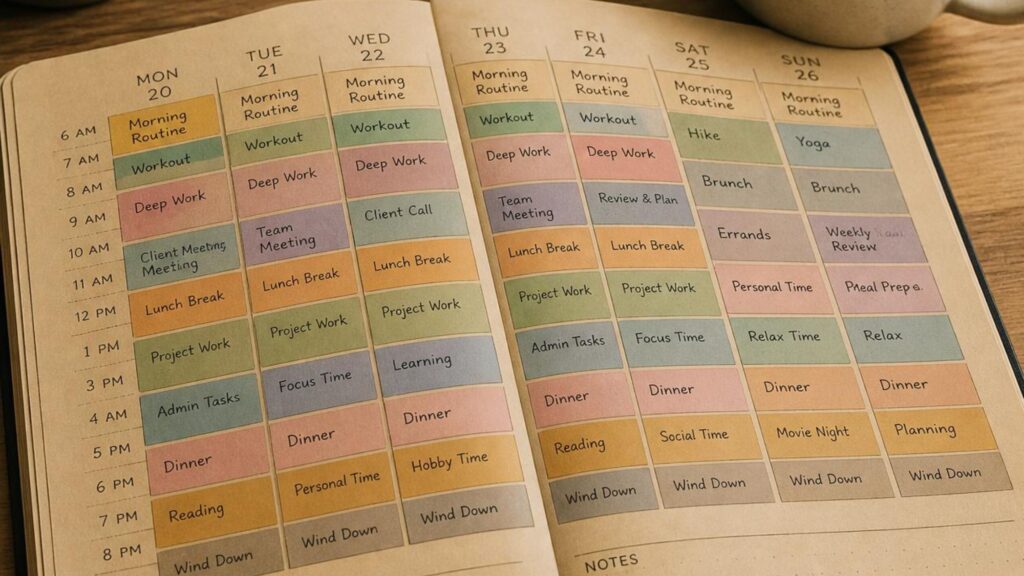
Not every hour of your day carries the same energy. Most people have a period where they feel sharp and alert, and another where focus drops off. Time blocking works best when you match your hardest tasks to your highest-energy hours, rather than scheduling by convenience alone.
If you’re sharpest in the morning, block that time for your most demanding work, such as writing, planning, or problem-solving. Save your afternoon slump for lighter tasks, like replying to emails or filing paperwork. If you tend to hit a wall after lunch, don’t fight it. A short walk or a quick rest helps you get through that dip, so you don’t waste a whole block on low-quality work.
Pay attention over a week or two to when your energy actually rises and falls. It won’t always match what you expect. Once you know your pattern, build your schedule around it instead of fighting it. This one adjustment can make the same eight-hour day feel far more productive.
Regularly Reviewing Your Time Blocking Results
Time blocking isn’t a set-and-forget system. Your first schedule won’t be perfect, and that’s fine. Set aside a few minutes at the end of each day or week to review how your blocks actually went.
Ask yourself simple questions. Did you have enough buffer time between tasks? Did meetings run over and throw off your afternoon? Did you actually finish what each block was meant for, or did tasks spill into the next slot? Answering these honestly tells you exactly what to adjust.
Use what you learn to fine-tune your approach. Stay flexible, and don’t be afraid to experiment with different block lengths, task orders, or new techniques. A block that works for one type of task might not work for another. Reviewing regularly is what turns time blocking from a rigid rule into a system that actually fits your life.
Common Mistakes With Time Blocking
Even a good system can fail if you fall into a few common traps. Knowing them in advance makes it easier to avoid them.
- Scheduling every single minute of the day, leaving no room for the unexpected.
- Ignoring buffer time between blocks, so one delay ruins the rest of the schedule.
- Setting unrealistic time estimates for tasks, which sets you up to fall behind.
- Treating break blocks as optional and skipping them when you feel busy.
- Giving up after the first messy week instead of adjusting the plan.
- Checking email or messages during focused work blocks, which breaks your concentration.
Most of these mistakes come from trying to be too rigid too soon. Start with a looser schedule, build the habit, then tighten it up as you learn what realistically fits into a day.
Practical Tips to Maximise Productivity With Time Blocking
Here are a few extra habits that make time blocking easier to stick with.
- Start small. Block out two or three tasks a day at first, then add more once the habit sticks.
- Be realistic about how long tasks take, and always add buffer time between blocks.
- Leave some open space in your day for spontaneous ideas or unplanned work.
- Schedule breaks and rest as seriously as you schedule tasks.
- Use colour-coding or symbols to spot your task types at a glance.
- Review your day briefly before bed and note one thing that worked well.
None of these tips need to be followed perfectly from day one. Pick two or three, try them for a week, and build from there.
Frequently Asked Questions
Is time blocking better than a to-do list? They work best together. A to-do list captures what needs doing. Time blocking decides when each task happens, which stops your list from growing without ever shrinking.
How long should each time block be? It depends on the task. Focused work often suits 60-90 minute blocks, while admin tasks can fit into shorter 20-30 minute slots. Adjust based on what you learn from reviewing your results.
What if something urgent interrupts my time block? Note it down and deal with it in your next open slot, unless it’s truly urgent. Constantly breaking blocks for minor interruptions defeats the purpose of the method.
Do I need an app for time blocking? No. A paper planner works just as well as a digital calendar. Choose whichever one you’ll actually use every day.
How long does it take to see results from time blocking? Most people notice a difference within one to two weeks. By then, you’ve usually adjusted your block lengths and built the habit of reviewing your day.
Recommended Books on Productivity and Time Management
If you want more depth on productivity and time management, these books are worth reading.
- Stephen Covey’s “The 7 Habits of Highly Effective People: Powerful Lessons in Personal Change” offers practical lessons for growth. It covers both your personal life and your work. You can find it here.
- Cal Newport’s “Deep Work: Rules for Focused Success in a Distracted World” explores the value of working without distraction. It shares practical ways to build that skill. Find it here.
- David Allen’s “Getting Things Done: The Art of Stress-Free Productivity” introduces the GTD method. It’s a simple system for organising tasks and cutting stress. Find it here.
- “Essentialism: The Disciplined Pursuit of Less” by Greg McKeown argues for doing fewer things well instead of many things poorly. Find it here.
- Graham Allcott’s “How to be a Productivity Ninja: Worry Less, Achieve More and Love What You Do” takes a light-hearted approach. It offers practical ways to manage your workload. Find it here.
- Jeff Sutherland’s “Scrum: The Art of Doing Twice the Work in Half the Time” explains the Scrum framework. Its principles apply well beyond software teams. Find it here.
Conclusion
Time blocking brings order to a busy day. It turns a vague to-do list into a clear plan, with a set time for every task. You focus on one thing at a time, avoid the trap of multitasking, and build in breaks that keep your energy up.
It won’t be perfect on day one. Give it a few weeks, review what’s working, and adjust as you go. Once your system fits your life, you’ll wonder how you managed your day without it.