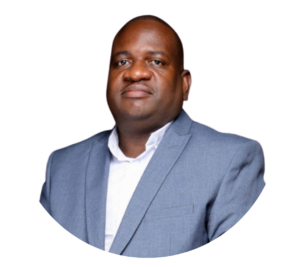

Most people try to get more done by organising harder. Nate O’Brien does the opposite. Nate stays productive by cutting things out, not by adding more lists or more apps. His whole system rests on one idea. Less is more.
This article breaks down how Nate stays productive. It uses the habits he shared in one of his videos on the subject. You will find his method for cutting distractions. You will also find his egg timer trick and his “eat the frog” rule. There is his meeting-batching schedule too, plus the short daily task list he writes by hand. Each section explains the habit, why it works, and how you can try it yourself.
Who Is Nate O’Brien?
Nate O’Brien is an entrepreneur. He runs a group of YouTube channels with a combined audience of more than three million subscribers. He built that audience by talking openly about money, productivity and personal growth.
He is not a productivity guru selling a course. He is someone who tests systems on himself first. He only shares what actually worked for him, and drops the rest.
That approach is part of why his advice on staying productive has stuck with so many viewers. He is not repeating theory he read somewhere else. He is describing a routine he actually lives by, day after day.
In his video on this topic, Nate explains how he manages to stay productive for almost the entire day. He does this without burning out. He also does it without feeling constantly busy, which is a different thing entirely.
Nate is upfront that this is not about squeezing more tasks into your schedule. It is about clearing enough space so the tasks that matter get done without a fight. That distinction is the whole point of his approach. It is why Nate stays productive without looking rushed in his own videos.
You can watch the full video here as well:
Nate’s Core Philosophy: Less Is More
Most productivity advice tells you to add something. Add an app. Add a routine. Add a morning ritual with seven steps. Nate stays productive by doing the reverse of all that.
He looks at his day and asks what he can remove instead. This one shift changes almost everything else about how he plans his time.
This matters because a packed schedule is not the same thing as a productive one. You can fill eight hours with meetings and small tasks. You can still finish the day having done nothing that truly counts. Nate’s point is that busyness and output are two different things. Most people confuse them without realising it.
The “less is more” mindset shows up in every habit below. He does not ask how to fit more in. He asks what he can cut, so the important work has room to breathe. Once you see that pattern, the rest of his system makes far more sense.
This also explains why Nate stays productive without relying on willpower alone. Willpower runs out as the day goes on, no matter how motivated you feel in the morning. A system that removes temptations and distractions needs far less willpower to hold up. That is a more reliable foundation than motivation, which comes and goes on its own schedule.
Minimising Tasks and Distractions
It is easy to end up with an endless to-do list. It is just as easy to end up with a phone that never stops buzzing. Nate’s answer is not a better filing system. It is fewer inputs in the first place.
He believes the real skill is not organising every part of your life. It is deciding what does not deserve your attention at all. That is a harder skill than it sounds, because saying no takes practice.
This section covers three habits Nate uses to protect his focus. He makes himself hard to reach. He uses a simple kitchen timer. He tackles his hardest task before anything else gets in the way.
Making Yourself Hard to Contact
Nate sets firm boundaries around his time. He puts his phone on airplane mode during focus blocks. Sometimes he simply turns off notifications instead. He also says no to requests for his time that do not serve his priorities that day.
The reasoning here is straightforward. Every notification is a small interruption. Small interruptions add up fast over the course of a day. A single message might only cost you ten seconds to read.
But it can cost you several minutes to get back to the depth of focus you had before it arrived. Studies on interrupted work back this up again and again. Nate treats his attention like a limited resource, because it genuinely is one.
In practice, this could look like leaving your phone in another room while you write a report. It could mean closing your email tab for a two-hour block each morning. It could also mean telling a colleague you will answer their question at 3pm, not right now.
None of this is complicated. It just requires saying no more often than feels comfortable at first. Most people find the first week the hardest, and it gets easier from there.
Using an Egg Timer for Focus Is How Nate stays productive
Nate uses a plain egg timer to structure his work sessions. He sets it for around 55 minutes. Then he commits to working on one task until it rings. During that stretch, he does not check his phone. He does not switch to anything else either.
The logic behind this is simple. A visible, ticking countdown creates a small sense of pressure. That pressure keeps your mind on the task in front of you. It also gives you permission to ignore everything else, because you know a break is coming soon.
This idea sits close to the Pomodoro method, which many people already know. Nate keeps his sessions slightly longer, though, and deliberately low-tech. He is not trying to reinvent focus techniques. He is just using one that works for him.
You do not need his exact timer to copy this habit. Any physical timer will do the job. A phone timer set to do-not-disturb mode works just as well. The point is not the device itself.
The real point is giving yourself one task and one deadline. Nothing else should compete for your attention until the bell goes off. This is one of the clearest reasons Nate stays productive for such long stretches without losing focus.
Eating the Frog First
Nate tackles his hardest, most uncomfortable task as the very first thing he does each day. People often call this “eating the frog” and that’s one of the main habits Nate stays productive The phrase comes from an old idea. Eat a live frog first thing in the morning. Nothing worse can happen to you for the rest of the day.
The reasoning is about willpower more than anything else. Most people have more discipline early in the day. Decisions and distractions have not worn them down yet. Nate uses that window on the task he is most likely to avoid. He does not save it for the afternoon, when he has less energy left to face it.
There is also a psychological payoff worth mentioning. Finishing the hardest task early creates real momentum. That momentum carries through the rest of the day. If you spend your morning on small, easy wins instead, the big task just sits there. It takes up mental space until you finally deal with it.
Nate would rather get the discomfort out of the way while he is fresh. This is a small habit with a large effect on how the rest of the day feels. It is also one of the simplest reasons Nate stays productive from the very first hour onward.
There is a practical side to this too. Hard tasks often need more thinking, more energy, and more concentration than easy ones. Meetings and small distractions chip away at your focus as the day goes on. Do the hard task later, and it starts to feel harder than it really is. Doing it first avoids that problem completely.
Batching Meetings for a Clearer Schedule
Meetings scattered across a week break your days into small, useless fragments. A meeting at 10am and another at 2pm can waste the hours between them. You never quite settle into deep focus before the next interruption arrives. Nate stays productive partly by refusing to let this happen to his own calendar.
Schedule Specific Days for Meetings
Nate sets aside one or two specific days each week for meetings and calls. He keeps the rest of his days completely free of them. This is a form of batching. It means grouping similar activities together, so they do not bleed into time meant for other kinds of work.
The benefit is protecting large, uninterrupted blocks of time on the days without meetings. Say Monday and Friday are his meeting days. Then Tuesday, Wednesday and Thursday stay reserved for writing, planning or deep work. Nothing splits those mornings in half.
If you cannot control your entire calendar, you can still apply a smaller version of this idea. Ask to move recurring one-to-ones onto the same day each week. Group your calls in the afternoon and protect your mornings instead.
Read more about the wider approach in this guide on batching tasks and meetings. It explains how this can cut down on wasted time across your whole week, not just around meetings.
The same idea applies to small admin tasks, not only meetings. Replying to every email as it lands breaks your focus in the same way as an unplanned call. Batch those small tasks into one or two set slots each day instead. It protects your attention just as well as batching meetings does.
Writing Down Tasks and Using Notion
Nate keeps his planning simple on paper. Then he uses digital tools to manage the bigger picture. This combination is worth separating into two parts, because each part solves a different problem.
Pen and Paper for Your Top Tasks
Each morning, Nate takes a pen and a piece of paper. He writes down three primary tasks for the day. These are the tasks that matter most and cannot be skipped. He also lists three secondary tasks, to fill any extra time that shows up once the main three are done.
The reasoning here is about limits. A long to-do list gives your brain permission to avoid the hard items. It lets you tick off easy ones instead and still feel productive. Limiting yourself to three primary tasks forces a real decision about what actually matters that day.
It also makes the list achievable, which matters more than people think for motivation. A list of twenty items can feel defeating before you even start. A list of three feels like something you can actually finish.
Try this yourself before opening any app in the morning. Write three tasks that would make the day a genuine success, even if nothing else got done. Then write three smaller tasks for any time left over. You will likely find the exercise itself clarifies your priorities faster than any app can.
Using Notion to Stay Productive
For everything beyond his daily top three, Nate stays productive by relying on Notion to keep his projects organised. He likes its customisable interface. He also likes its databases, to-do lists and project boards. Everything sits inside one workspace, instead of being scattered across separate apps.
The case for a tool like this is about reducing mental load. Say your notes live in one app, your tasks in another, and your project plans in a spreadsheet. You end up spending energy just hunting for information. A single connected workspace removes that friction. This matters even more once you are collaborating with other people.
If you want to try the same setup Nate uses, you can get started with Notion here for free. This piece on Notion’s all-encompassing features takes a closer look at why a single hub works so well for planning. It also goes into more detail on setting one up properly.
This site also earns a small commission if you sign up through that Notion link. That comes at no extra cost to you. It is disclosed here as an affiliate link, in the spirit of full transparency.
Not every productivity habit needs software behind it, though. Maybe you would rather explore a broader range of options first. This overview of how digital tools and apps can support your workflow compares several approaches beyond Notion alone. Whichever tool you pick, the underlying habit matters most. Keep one place for your tasks, not five scattered ones.
Leaving Buffer Time in Your Schedule
A schedule with zero spare minutes falls apart the moment something unexpected happens. Nate stays productive by building buffer periods into his day for exactly this reason. An urgent email will show up sooner or later. So will a longer call than planned, or a task that takes more time than you guessed.
Buffer Periods as a Safety Net
These short gaps act as a safety net for the rest of the day. If a meeting overruns by ten minutes, the buffer absorbs it. It does not push every later task back by ten minutes too. Without that slack, one small delay can knock your entire afternoon off course.
The reasoning here is realistic rather than pessimistic. Nate is not planning for disaster. He is simply accepting that time estimates are rarely perfect. Leaving no room for error guarantees stress the first time something runs long, and something always eventually does.
A 15 to 20-minute buffer between major blocks of work is often enough. It absorbs most everyday surprises without wasting much of your day. Longer buffers make sense on days packed with back-to-back meetings, where delays are far more likely to happen. Try leaving a short gap after every meeting and before every deep-work block on your own calendar.
Treat that gap as protected time too, not an invitation to schedule something else into it. The whole purpose is flexibility. That only works if the buffer stays genuinely empty until it is actually needed.
The Benefits of Staying Productive
All of this effort has one clear purpose for Nate. It is more free time, not less. He is not minimising tasks so he can cram in extra work afterwards. He is doing it so the essential work gets finished faster.
More Free Time for What You Love
By cutting distractions and shrinking his task list to what matters, Nate gets more done in less time. His focus is protected by timers and buffers throughout the day. That saved time becomes leisure time, not more work squeezed into the gap.
This is the actual reward behind the whole system. It is worth remembering whenever the habits above start to feel like extra effort rather than less. Nate stays productive precisely so he can stop working sooner, not so he can work even more.
It is worth contrasting this with how many people treat productivity. They see it as a way to squeeze in extra tasks, extra projects, and extra side hustles. Nate treats it as a way to buy back hours he would otherwise lose to disorganisation and distraction. Those hours then go toward rest, hobbies, or time with people he cares about, rather than another item on a list.
Common Mistakes When Copying This System
One of the biggest mistakes people make is trying to copy Nate’s entire productivity system all at once. It can be tempting to start every habit on the same Monday, but seven new routines rarely survive beyond the first few days. A better approach is to focus on one habit at a time, whether that is using an egg timer, creating a three-task priority list, or blocking distractions during deep work sessions. The reason Nate stays productive is not because he adopted dozens of habits overnight. He built them gradually until they became automatic.
Another common error is treating buffer time as extra work time. Many people create small gaps in their schedule, only to immediately fill them with more tasks. Those spare 15 minutes are meant to act as a cushion when something unexpected comes up. Once you start using every available minute for additional work, you eliminate the flexibility that keeps your day running smoothly. Before long, you are back to an overloaded schedule with no room for delays, interruptions, or last-minute priorities.
Some people embrace the “eat the frog” strategy but misunderstand what the frog actually is. The most important task is not always the largest, most complicated, or most impressive item on your to-do list. More often, it is the task you have been avoiding for days or even weeks. That lingering assignment continues to consume mental energy until it is completed. Nate stays productive because he identifies the task he is most likely to postpone and tackles it first, rather than choosing a task that simply looks important on paper.
Overcomplicating productivity tools is another trap that catches many people. Whether you use Notion, Trello, or another platform, the goal is to make work easier, not create a second job managing the system itself. Nate uses Notion as a simple organisational tool, not as an elaborate network of dashboards, databases, and endless customisations. If setting up your workspace takes longer than completing the actual work, the tool has become a distraction instead of a solution.
Meeting batching is another practice that is often copied incorrectly. Some people schedule meetings on specific days but then spend their so-called free days responding instantly to every email, message, and notification that appears. This constant context switching destroys the focus that meeting batching is supposed to create. To make the strategy work, you need to protect your uninterrupted work time just as carefully as you protect your calendar. Nate stays productive because he defends those focus blocks consistently, allowing him to concentrate on meaningful work without being pulled in multiple directions throughout the day.
Ultimately, the goal is not to replicate every detail of someone else’s productivity system. The goal is to understand the principles behind it and adapt them to your own workflow. Start small, stay consistent, and build habits that support long-term success rather than chasing a perfect productivity setup from day one.
Frequently Asked Questions
Who is Nate O’Brien?
Nate O’Brien is an entrepreneur and YouTube creator. He runs a group of channels with a combined audience of more than three million subscribers. He shares his own systems for money, productivity and personal growth.
How does Nate stay productive for almost the whole day?
Nate stays productive by minimising tasks and distractions, rather than organising more of them. He limits contact, uses a timer for focus, and tackles his hardest task first. He also batches meetings, writes down only his top priorities, and leaves buffer time for the unexpected.
What is the “eat the frog” method Nate uses?
It means doing your hardest, most avoided task first thing in the morning. This is when your willpower and energy are usually at their highest. Nate says this creates momentum and stops the task hanging over the rest of his day.
Do I need an actual egg timer to copy this habit?
No. Any timer works, including a plain phone timer. Commit to one task until it rings. Avoid checking your phone during that block, and the exact device stops mattering.
Why does Nate only write down three main tasks a day?
Limiting the list to three primary tasks forces a real choice about what matters most. It stops easy, low-value tasks from crowding out the work that actually counts that day.
Is Notion necessary to copy Nate’s system?
No. Notion is simply the tool Nate happens to use for organising projects beyond his daily top three tasks. Any tool that keeps your tasks, notes and plans in one place will support the same underlying habit.
What is a buffer period, and why does Nate use one?
A buffer period is a short, deliberately unscheduled gap between tasks or meetings. Nate uses it to absorb delays and interruptions. This stops small problems from pushing back everything else planned for the day.
Where can I watch Nate explain this system himself?
You can watch Nate’s original video on the subject. You can also follow more productivity content on this site’s own YouTube channel, PRODUCTIVE MINDSETZ.
Final Thoughts
Nate stays productive not by working harder, but by working on less. Every habit in this article points back to the same idea. Remove what does not matter, and protect what does.
You do not need his exact tools or his exact timer to get results. You need his willingness to cut things out, rather than piling more on top of an already full day.
Start small. Pick one habit from this article. It could be the egg timer, the three-task list, or a single buffer period in your afternoon. Give it two weeks before judging whether it works.
That is how Nate built this system in the first place. He changed one habit at a time, not all of them at once. Anyone can copy that part, whatever tools they end up using.